MySQL DBA Course
Getting Started with MySQL
Data Management in MySQL
Variables and Stored Routines
MySQL Security
Optimization and Performance Tuning
Scaling and High Availability
DBA A. Introduction to DBMS and RDBMS
Agenda
- Flat File Databases
- Drawbacks of Flat File Databases
- Database Management System
- Usage of DBMS
- Functionalities of database system
- Data models
- RDBMS and 12 Rules
- Properties of Relations
- Keys and Referential Integrity
Do you know?
- Data: are known facts which are recorded with implicit meaning
- Database : it is a collection of logically related data at one place.
- Data Base Management System: A software to Manage the Database
Flat File Databases
- In a Flat File Database, the data is managed in file systems.
- A program written in high level language like COBOL used to manage and arrange the data as per the need.
- For any change in data structure, program was also required to be changed.
Drawbacks of Flat File Databases
- Data redundancy.
- No uniformity in the data
- A Specific data file could satisfy the need of a specific program only.
- No security control.
- DBMS
Goals of a database management system
- To provide an environment which will efficiently provide access to data in database
- Implement security, control in concurrency and recovery from crash.
- It is a general purpose facility:
- To define database
- To construct database
- Manipulate database
Benefits of database Approach
- One Software to manage Data and Business Logic.
- Redundancy reduced
- Inconsistency avoided
- Data is shared
- Standard were enforced
- Security was applied
- Integrity was maintained
DBMS Architecture
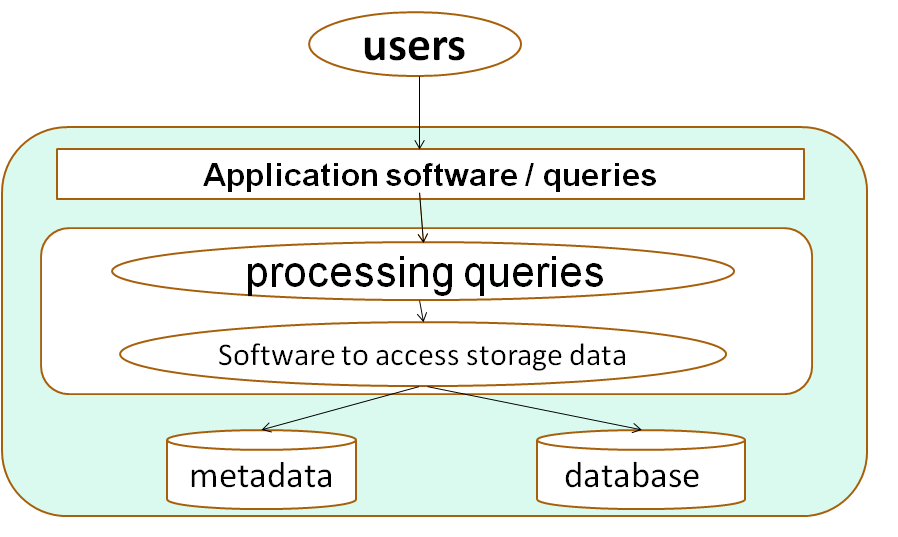
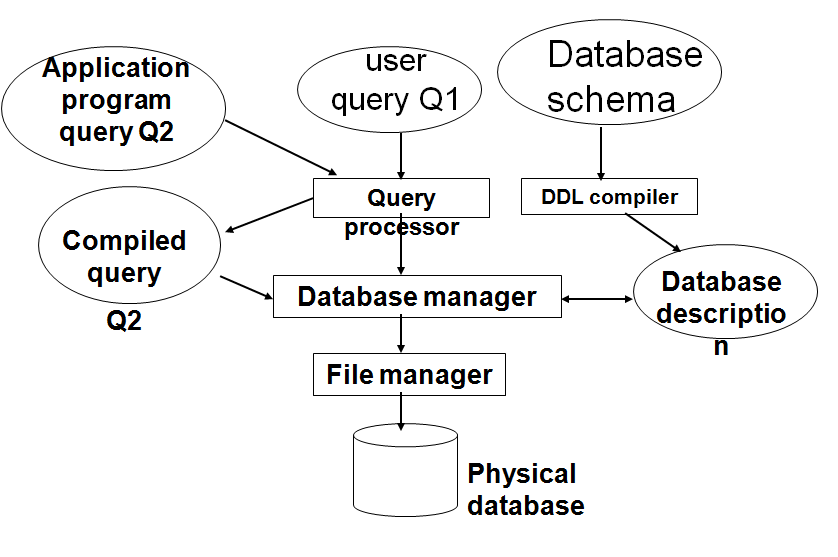
More on DBMS Architecture
- Database system is of three types
- Conceptual
- Physical
- Representational
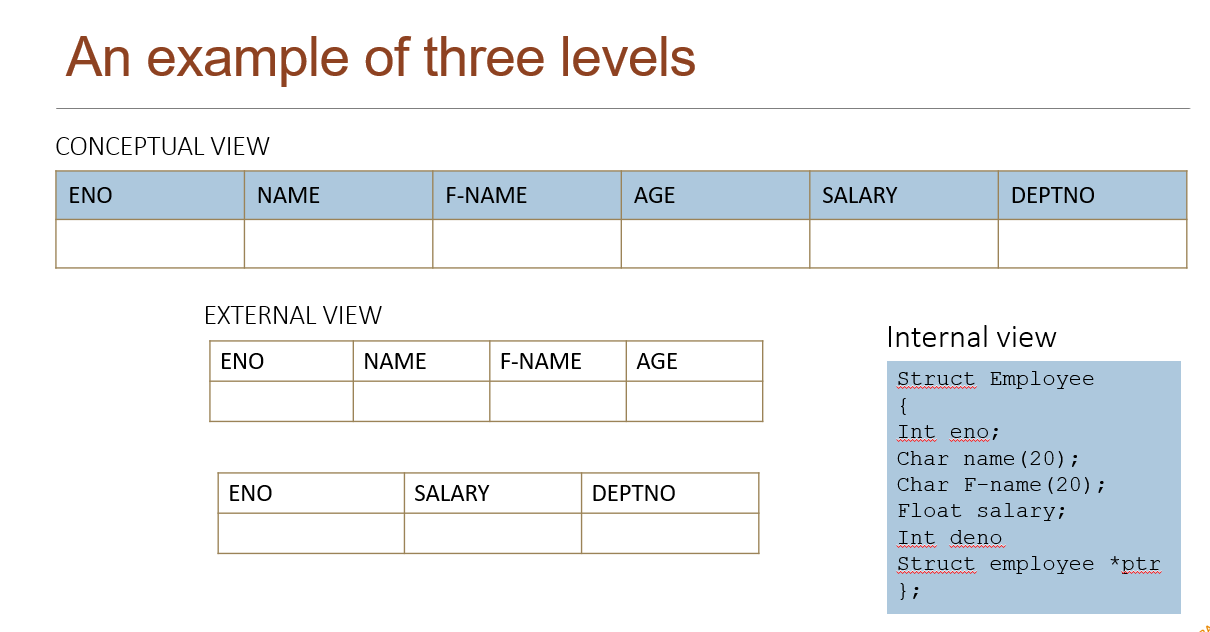
An example of three levels 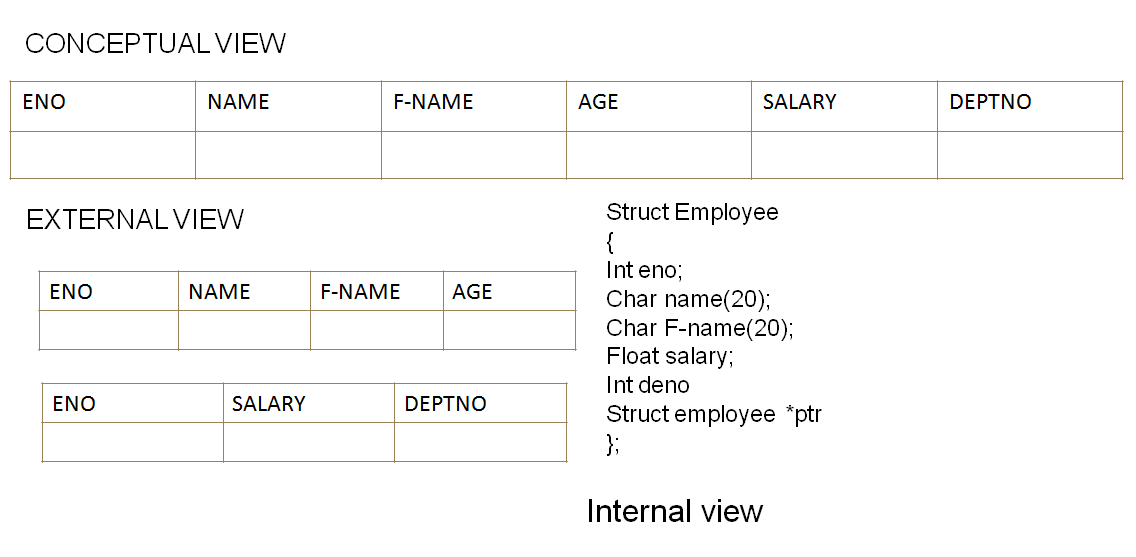
Schema
- Schema: description of data in terms of a data model
- Three-level DB Architecture defines following schemas:
- External Schema (or sub-schema)
- Writing using external DDL\
- Conceptual schema
- Writing using conceptual DDL
- Internal Schema
- Writing using internal DDL or Storage structure definitional
- External Schema (or sub-schema)
Database Models
Relational model
- Dr. E. F. Codd described the relation model in 1970
- He put 12 rules describing the relational model
- All the RDBMS applications should follow the rules
Rules Given by Dr. E F codd.
- Information rule - 1
- Database must consist of tables and data should be stored in the form of a table only.
- Guaranteed access rule - 2
- The data can be accessed by specifying table name, column name and the columns that defined the primary key . Primary key ensures that each value is unique and accessible.
- Systematic treatment of NULL values - 3
- A null is a unknown value and every database must have a provision for storing NULLs.
- NULL != 0
- NULL != nothing
- NULL != NULL
- NULL is NULL
- Dynamic on-line catalog based on the relational model - 4
- this rule says that user data should be stored in tables and the information about the table such as structure and other information in tables only.
- One as user tables and another as metadata this metadata is what called as system catalog.
- Comprehensive sub language - 5
- There must be at least one language which supports data defining, view defining , manipulating data, integrity constraints.
- All the above should be supported with well defined syntax, as character strings.
- View updating rule - 6
- Should support a mechanism which designs different combinations of data from different tables called as views. All the view should be updateable automatically if the data in the table(s) is changed.
- Either it is a simple view or a complex view it should allow updates to the view.
- High level insert update and delete rule - 7
- Data manipulation operations treat Rows as a set. These set operations and relational operators are used to work on table.
- Use of insert, update and delete operations on views should act on their respective tables
- Physical data independence rule - 8
- Changes in the data storage should not effect programs that access the data.
- Logical data independency rule - 9
- The data is stored in the files physically, but tables are logical structures. So for making any changes need in logical structures there is no need of any change in the application.
- Integrity independency rule - 10
- Data integrity means the consistency and accuracy which keeps the garbage out of the database.
- Integrity constraints must be the supported functionality of any database application.
- Distribution rule - 11
- To the end user all the commands should be working a same as it would working for the local database even though the database is in some other place and user is accessing through network.
- Non subversion rule - 12
- All the constraints defined by the user using the SQL should not be bypassed by any other way.
Some Important Terms
- Relation : a table
- Tuple : a row in a table
- Attribute : a Column in a table
- Degree : number of attributes
- Cardinality : number of tuples
- Primary Key : a unique identifier for the table
- Domain : a pool of values from which specific attributes of specific relations draw their values
Relations or Tables properties
- There are no duplicate rows (tuples)
- Tuples are un-ordered, top to bottom
- Attributes are un-ordered, left to right
- All attribute values are atomic ( or scalar )
- Relational databases do not allow repeating groups
Keys
- Key : An attribute or set of attributes that uniquely identify each entity in an entity set.
- Super Key: If Additional attributes are added to a key, still uniquely identifying an entity. Such keys are called super keys.
- Candidate Keys: Two or more attributes that uniquely identify an entity. These attributes or combinations of attributes are called candidate keys.
- Primary Key: In such a case we must decide which of the candidate keys will be used as the primary key.
- Alternate Key: The remaining candidate keys would be considered alternate keys
- Secondary Keys: A secondary key is an attribute or combination of attributes that may not be a candidate key but classifies the entity set on a particular characteristic.
Watch the Lecture