Working with Text Embeddings
Packages that are being used in this notebook:
from importlib.metadata import version

print("torch version:", version("torch"))
print("tiktoken version:", version("tiktoken"))
torch version: 2.4.0
tiktoken version: 0.7.0
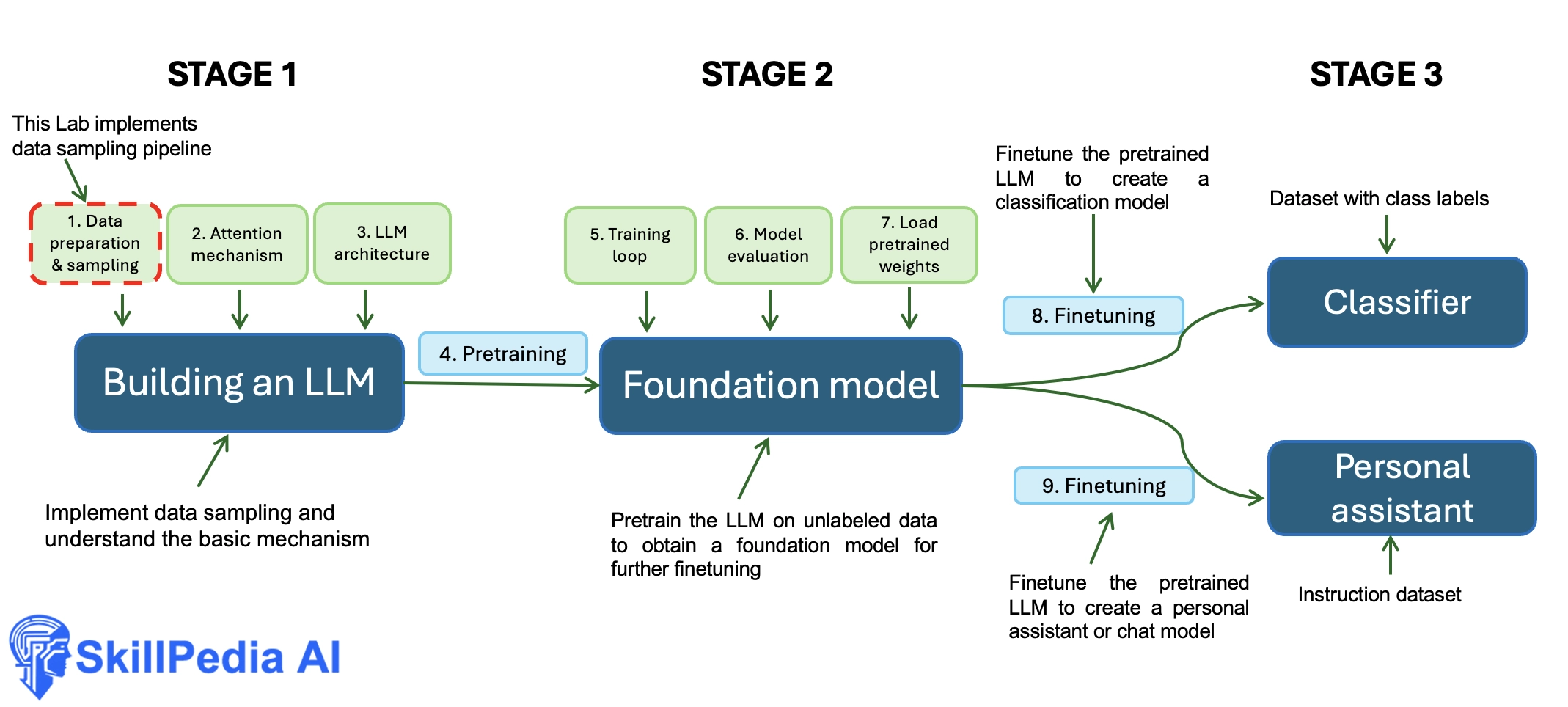
- We will learn data preparation and sampling to get input data "ready" for the LLM
1.1 Understanding word embeddings
- There are many forms of embeddings; we focus on text embeddings.
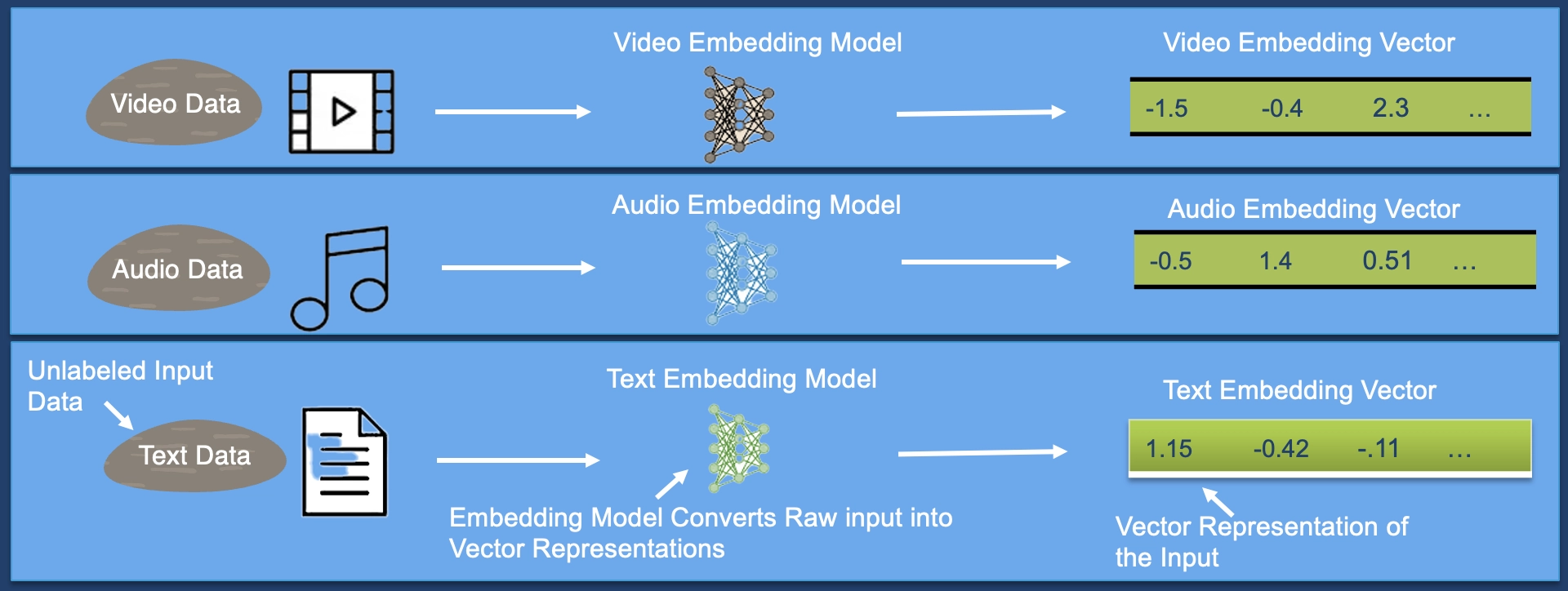
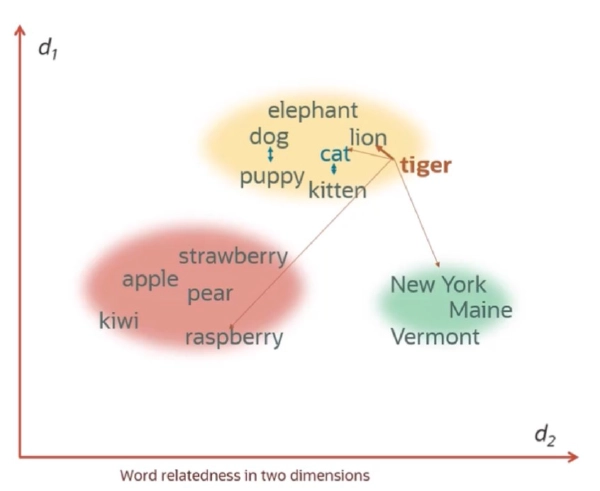
- LLMs work with embeddings in high-dimensional spaces (i.e., thousands of dimensions)
- Since we can't visualize such high-dimensional spaces (we humans think in 1, 2, or 3 dimensions), the figure below illustrates a 2-dimensional embedding space
1.2 Tokenizing text
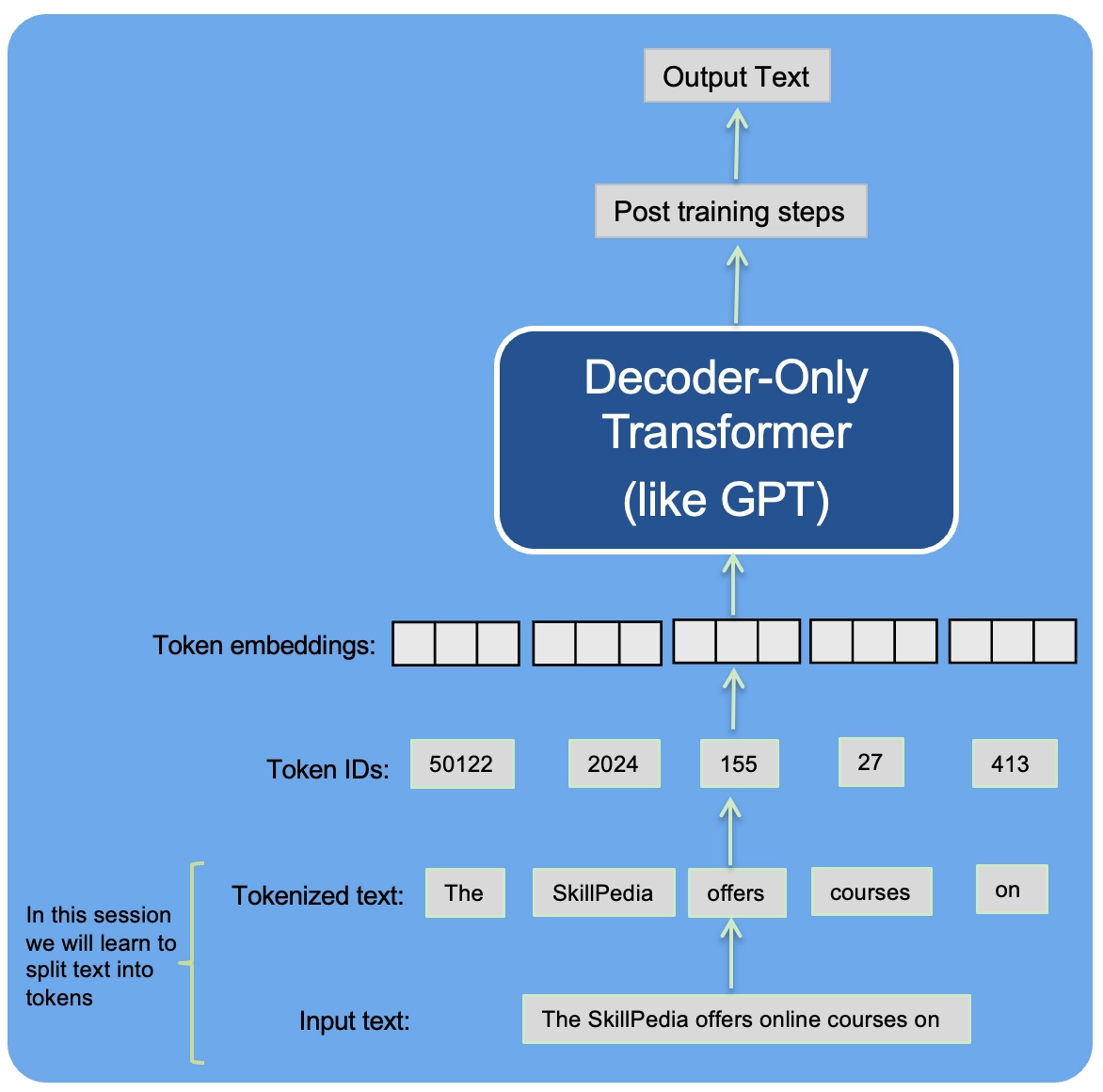
- Tokenizing text involves dividing it into smaller components, like individual words and punctuation marks.
- Load raw text we want to work with
- The Wonderful Wizard of Oz from Project Gutenberg. Project Gutenberg is a library of over 70,000 free eBooks
import os
import urllib.request

if not os.path.exists("wizard_of_oz.txt"):
    url = ("https://raw.githubusercontent.com/Sangwan70/Building-an-LLM-From-Scratch/refs/heads/main/part_1/01_main-code/wizard_of_oz.txt")
    file_path = "wizard_of_oz.txt"
    urllib.request.urlretrieve(url, file_path)
- (If you encounter an
ssl.SSLCertVerificationErrorwhen executing the previous code cell, it might be due to using an outdated Python version.) - OR
- Open the folder /Applications/Python 3.x (x is the version you are running).
- Double click the Install Certificates.command. It will open a terminal and install the certificate.
- Restart Kernel
with open("wizard_of_oz.txt", "r", encoding="utf-8") as f:
    raw_text = f.read()

print("Total number of character:", len(raw_text))
print(raw_text[50:200])
Total number of character: 232241
BAUM

  AUTHOR OF THE WIZARD OF OZ, THE LAND OF OZ, OZMA OF OZ, ETC.

  ILLUSTRATED BY JOHN R. NEILL

  BOOKS OF WONDER WILLIAM MORROW & CO., INC. NEW
- The goal is to tokenize and embed this text for an LLM
- Let's develop a simple tokenizer based on some sample text that we can then later apply to the given text above.
- The following regular expression will split on whitespaces
import re

text = "Hello, world. This, is a test?"
result = re.split(r'(\s)', text)

print(result)
['Hello,', ' ', 'world.', ' ', 'This,', ' ', 'is', ' ', 'a', ' ', 'test?']
- Let's enhance the regular expression to not only split on whitespaces but also on commas and periods.
result = re.split(r'([,.]|\s)', text)

print(result)
['Hello', ',', '', ' ', 'world', '.', '', ' ', 'This', ',', '', ' ', 'is', ' ', 'a', ' ', 'test?']
- As we can see, this creates empty strings, let's remove them
# Strip whitespace from each item and then filter out any empty strings.
result = [item for item in result if item.strip()]
print(result)
['Hello', ',', 'world', '.', 'This', ',', 'is', 'a', 'test?']
- This looks pretty good, but let's also handle other types of punctuation, such as periods, question marks, and so on
text = "Hello, world. Is this -- a test?"

result = re.split(r'([,.:;?_!"()\']|--|\s)', text)
result = [item.strip() for item in result if item.strip()]
print(result)
['Hello', ',', 'world', '.', 'Is', 'this', '--', 'a', 'test', '?']
- This is pretty good, and we are now ready to apply this tokenization to the raw text
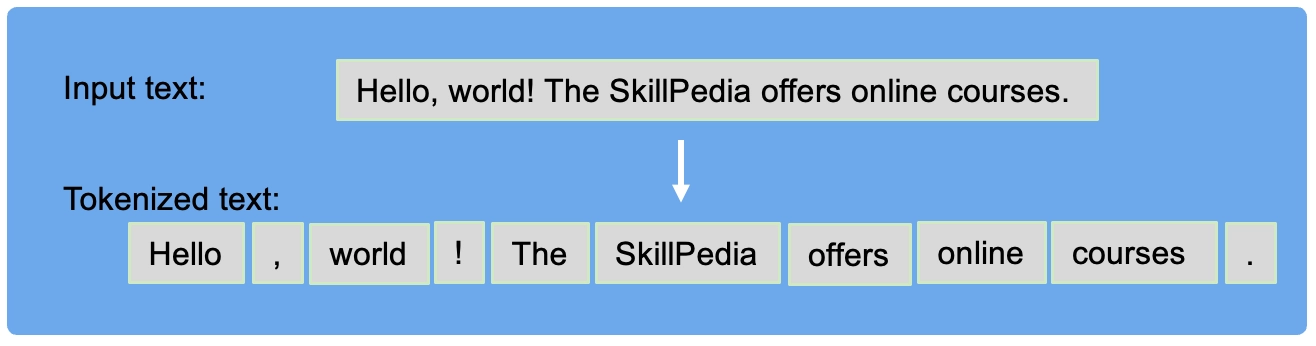
preprocessed = re.split(r'([,.:;?_!"()\']|--|\s)', raw_text)
preprocessed = [item.strip() for item in preprocessed if item.strip()]
print(preprocessed[:50])
['\ufeff', 'DOROTHY', 'AND', 'THE', 'WIZARD', 'IN', 'OZ', 'BY', 'L', '.', 'FRANK', 'BAUM', 'AUTHOR', 'OF', 'THE', 'WIZARD', 'OF', 'OZ', ',', 'THE', 'LAND', 'OF', 'OZ', ',', 'OZMA', 'OF', 'OZ', ',', 'ETC', '.', 'ILLUSTRATED', 'BY', 'JOHN', 'R', '.', 'NEILL', 'BOOKS', 'OF', 'WONDER', 'WILLIAM', 'MORROW', '&', 'CO', '.', ',', 'INC', '.', 'NEW', 'YORK', '[Illustration]']
- Let's calculate the total number of tokens
print(len(preprocessed))
52328
1.3 Converting tokens into token IDs
- Next, we convert the text tokens into token IDs that we can process via embedding layers later
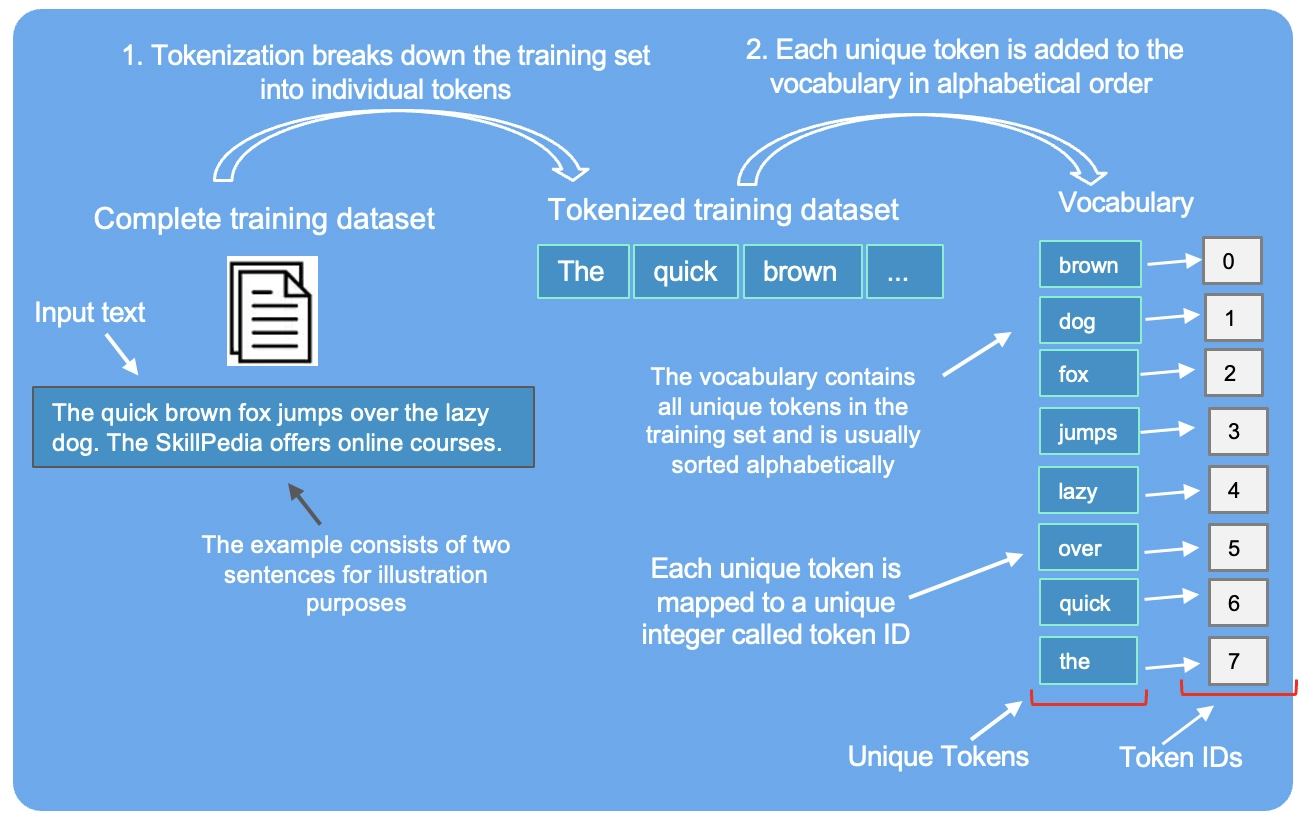
- From these tokens, we can now build a vocabulary that consists of all the unique tokens
all_words = sorted(set(preprocessed))
vocab_size = len(all_words)

print(vocab_size)
4688
vocab = {token:integer for integer,token in enumerate(all_words)}
- Below are the first 50 entries in this vocabulary:
for i, item in enumerate(vocab.items()):
    print(item)
    if i >= 50:
        break
('!', 0)
('"', 1)
('&', 2)
("'", 3)
('(', 4)
(')', 5)
('*', 6)
(',', 7)
('--', 8)
('.', 9)
('1', 10)
('10', 11)
('106', 12)
('11', 13)
('12', 14)
('120', 15)
('13', 16)
('131', 17)
('14', 18)
('142', 19)
('15', 20)
('16', 21)
('160', 22)
('17', 23)
('172', 24)
('18', 25)
('187', 26)
('19', 27)
('1908', 28)
('2', 29)
('20', 30)
('203', 31)
('217', 32)
('23', 33)
('231', 34)
('240', 35)
('251', 36)
('3', 37)
('4', 38)
('41', 39)
('5', 40)
('55', 41)
('6', 42)
('64', 43)
('7', 44)
('77', 45)
('8', 46)
('88', 47)
('9', 48)
('95', 49)
(':', 50)
- Below, we illustrate the tokenization of a short sample text using a small vocabulary:
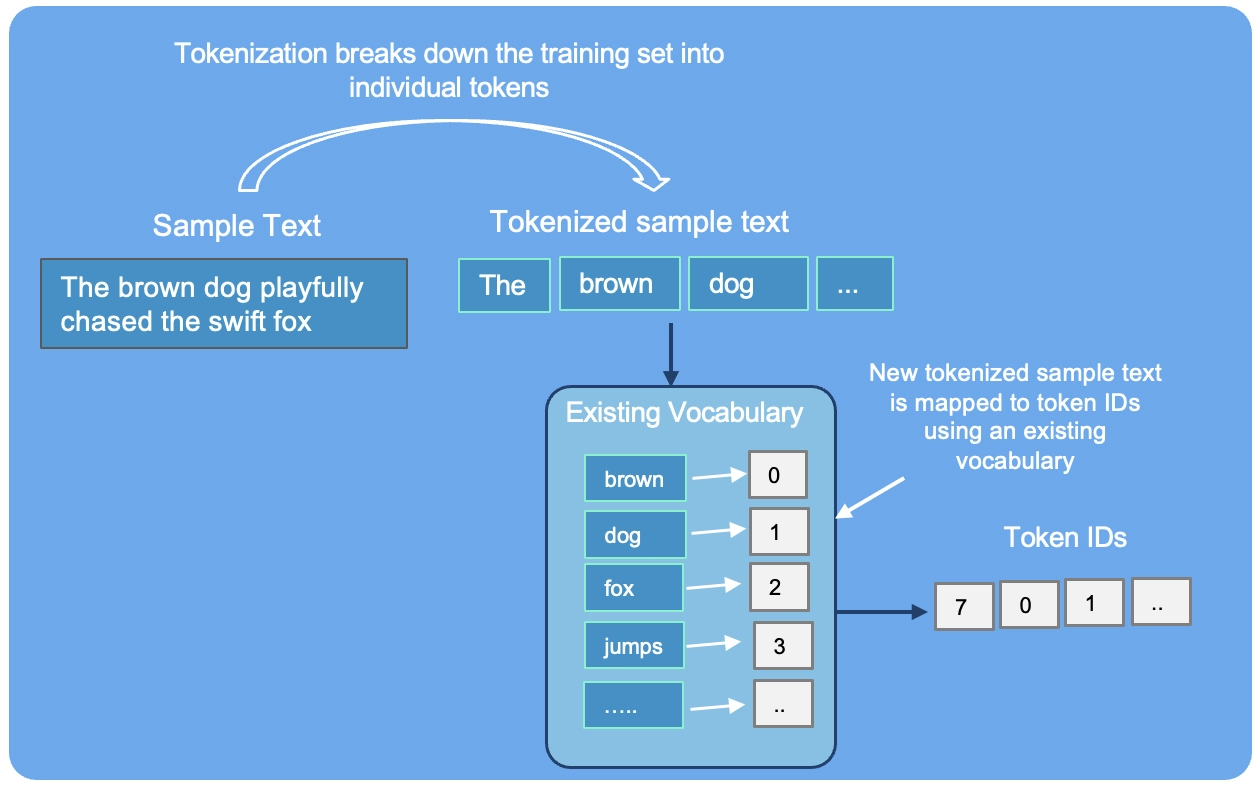
- Putting it now all together into a tokenizer class
class SimpleTokenizerV1:
    def __init__(self, vocab):
        self.str_to_int = vocab
        self.int_to_str = {i:s for s,i in vocab.items()}

    def encode(self, text):
        preprocessed = re.split(r'([,.:;?_!"()\']|--|\s)', text)

        preprocessed = [
            item.strip() for item in preprocessed if item.strip()
        ]
        ids = [self.str_to_int[s] for s in preprocessed]
        return ids

    def decode(self, ids):
        text = " ".join([self.int_to_str[i] for i in ids])
        # Replace spaces before the specified punctuations
        text = re.sub(r'\s+([,.?!"()\'])', r'\1', text)
        return text
- The
encodefunction turns text into token IDs - The
decodefunction turns token IDs back into text
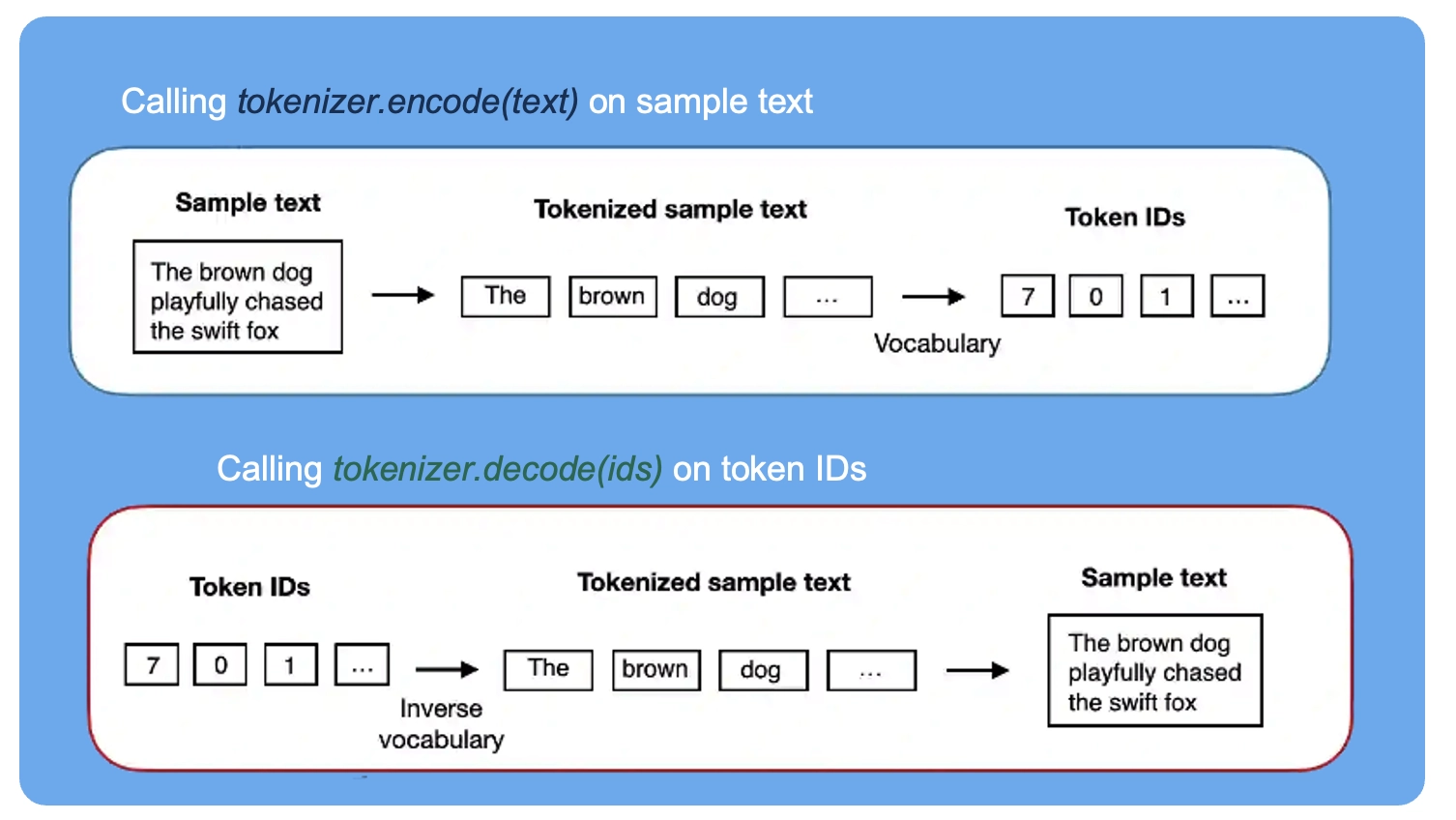
- We can use the tokenizer to encode (that is, tokenize) texts into integers
- These integers can then be embedded (later) as input of/for the LLM
tokenizer = SimpleTokenizerV1(vocab)

text = """Princess Ozma, whom I love as much as my readers do, is again introduced
in this story, and so are several of our old friends of Oz."""
ids = tokenizer.encode(text)
print(ids)
[497, 463, 7, 4573, 321, 2737, 886, 2895, 886, 2907, 3397, 1700, 7, 2534, 770, 2520, 2470, 4206, 4023, 7, 818, 3854, 866, 3701, 3010, 3053, 3023, 2117, 3010, 460, 9]
- We can decode the integers back into text
tokenizer.decode(ids)
'Princess Ozma, whom I love as much as my readers do, is again introduced in this story, and so are several of our old friends of Oz.'
tokenizer.decode(tokenizer.encode(text))
'Princess Ozma, whom I love as much as my readers do, is again introduced in this story, and so are several of our old friends of Oz.'
1.4 Adding special context tokens
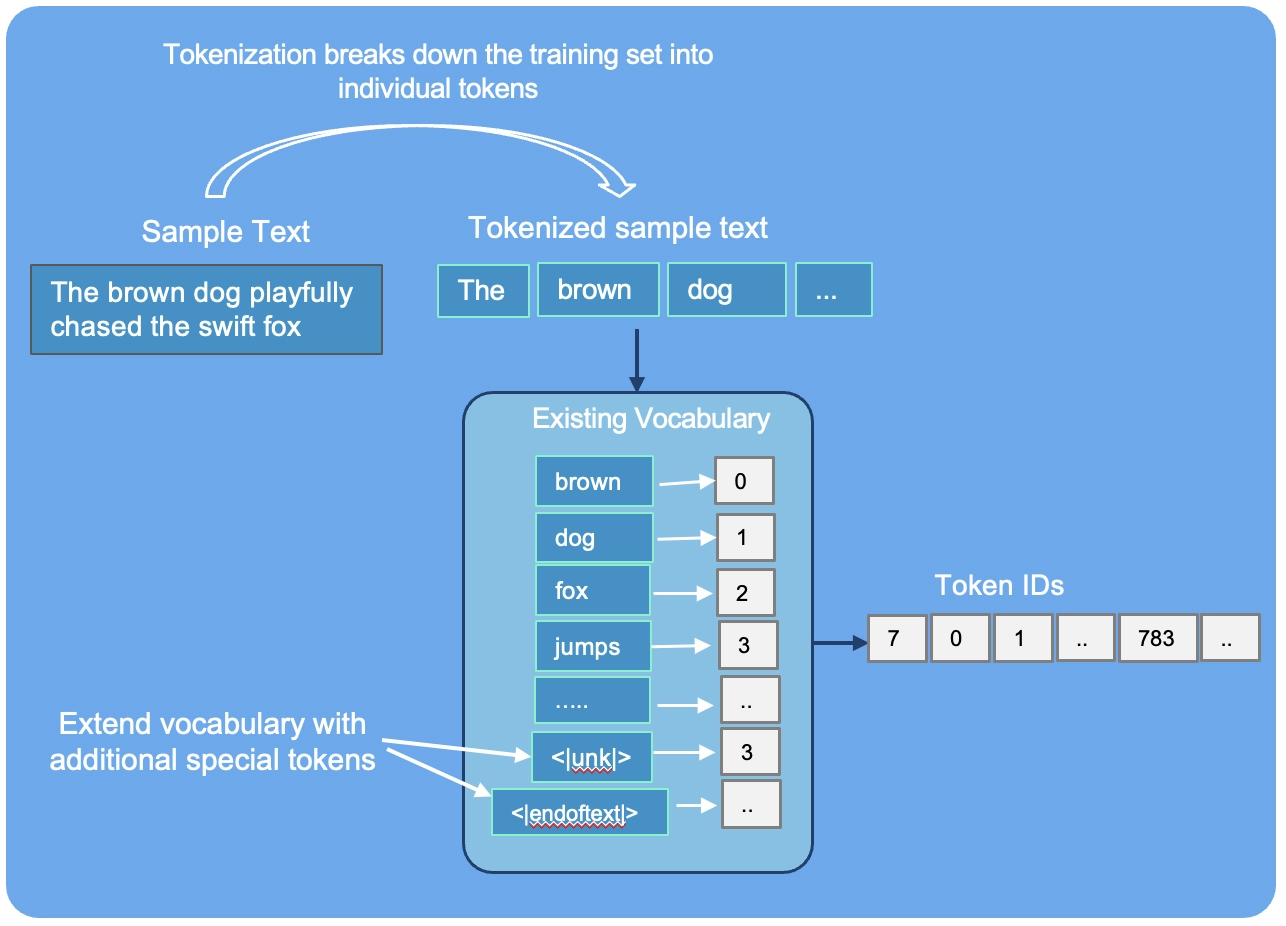
- It's useful to add some "special" tokens for unknown words and to denote the end of a text
-
Some tokenizers use special tokens to help the LLM with additional context
-
Some of these special tokens are
[BOS](beginning of sequence) marks the beginning of text[EOS](end of sequence) marks where the text ends (this is usually used to concatenate multiple unrelated texts, e.g., two different Wikipedia articles or two different books, and so on)[PAD](padding) if we train LLMs with a batch size greater than 1 (we may include multiple texts with different lengths; with the padding token we pad the shorter texts to the longest length so that all texts have an equal length)
-
[UNK]to represent words that are not included in the vocabulary -
GPT-2 does not need any of these tokens mentioned above but only uses an
<|endoftext|>token to reduce complexity -
The
<|endoftext|>is analogous to the[EOS]token mentioned above -
GPT also uses the
<|endoftext|>for padding (since we typically use a mask when training on batched inputs, we would not attend padded tokens anyways, so it does not matter what these tokens are) -
GPT-2 does not use an
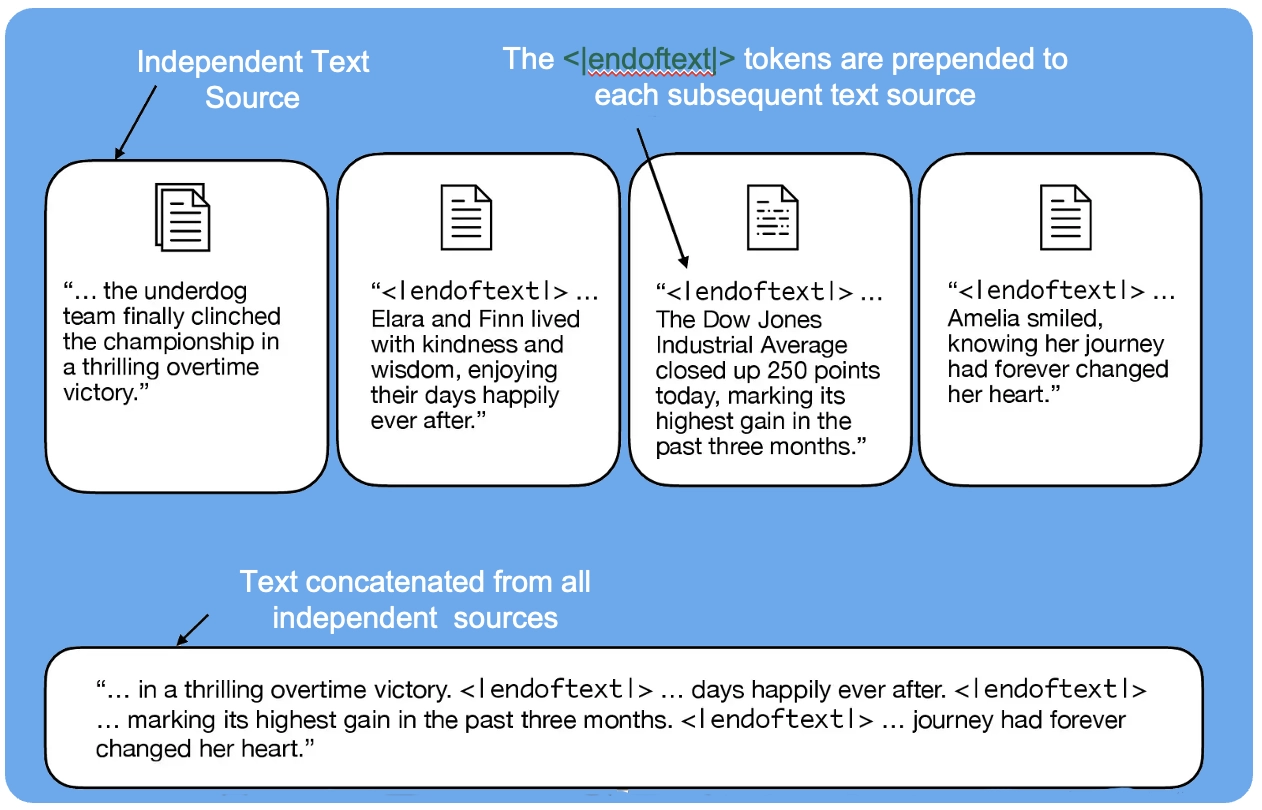
- We use the
<|endoftext|>tokens between two independent sources of text:
- Let's see what happens if we tokenize the following text:
tokenizer = SimpleTokenizerV1(vocab)

text = "Hello, have you completed OCI Generative AI Professional Certification Course?"

tokenizer.encode(text)
---------------------------------------------------------------------------
KeyError                                  Traceback (most recent call last)
Cell In[16], line 5
      1 tokenizer = SimpleTokenizerV1(vocab)
      3 text = "Hello, have you completed OCI Generative AI Professional Certification Course?"
----> 5 tokenizer.encode(text)

Cell In[12], line 12, in SimpleTokenizerV1.encode(self, text)
      7 preprocessed = re.split(r'([,.:;?_!"()\']|--|\s)', text)
      9 preprocessed = [
     10     item.strip() for item in preprocessed if item.strip()
     11 ]
---> 12 ids = [self.str_to_int[s] for s in preprocessed]
     13 return ids

KeyError: 'OCI'
- The above produces an error because the word "OCI" is not contained in the vocabulary
- To deal with such cases, we can add special tokens like
"<|unk|>"to the vocabulary to represent unknown words - Since we are already extending the vocabulary, let's add another token called
"<|endoftext|>"which is used in GPT-2 training to denote the end of a text (and it's also used between concatenated text, like if our training datasets consists of multiple articles, books, etc.)
all_tokens = sorted(list(set(preprocessed)))
all_tokens.extend(["<|endoftext|>", "<|unk|>"])

vocab = {token:integer for integer,token in enumerate(all_tokens)}
len(vocab.items())
4690
for i, item in enumerate(list(vocab.items())[-5:]):
    print(item)
('zebra', 4685)
('zig-zag', 4686)
('\ufeff', 4687)
('<|endoftext|>', 4688)
('<|unk|>', 4689)
- We also need to adjust the tokenizer accordingly so that it knows when and how to use the new
class SimpleTokenizerV2:
    def __init__(self, vocab):
        self.str_to_int = vocab
        self.int_to_str = { i:s for s,i in vocab.items()}

    def encode(self, text):
        preprocessed = re.split(r'([,.:;?_!"()\']|--|\s)', text)
        preprocessed = [item.strip() for item in preprocessed if item.strip()]
        preprocessed = [
            item if item in self.str_to_int
            else "<|unk|>" for item in preprocessed
        ]

        ids = [self.str_to_int[s] for s in preprocessed]
        return ids

    def decode(self, ids):
        text = " ".join([self.int_to_str[i] for i in ids])
        # Replace spaces before the specified punctuations
        text = re.sub(r'\s+([,.:;?!"()\'])', r'\1', text)
        return text
Let's try to tokenize text with the modified tokenizer:
tokenizer = SimpleTokenizerV2(vocab)

text1 = "Hello, have you completed OCI Generative AI"
text2 = "Professional Certification Course?"

text = " <|endoftext|> ".join((text1, text2))

print(text)
Hello, have you completed OCI Generative AI <|endoftext|> Professional Certification Course?
tokenizer.encode(text)
[303, 7, 2334, 4676, 1386, 4689, 4689, 4689, 4688, 4689, 4689, 4689, 52]
tokenizer.decode(tokenizer.encode(text))
'Hello, have you completed <|unk|> <|unk|> <|unk|> <|endoftext|> <|unk|> <|unk|> <|unk|>?'
1.5 BytePair encoding
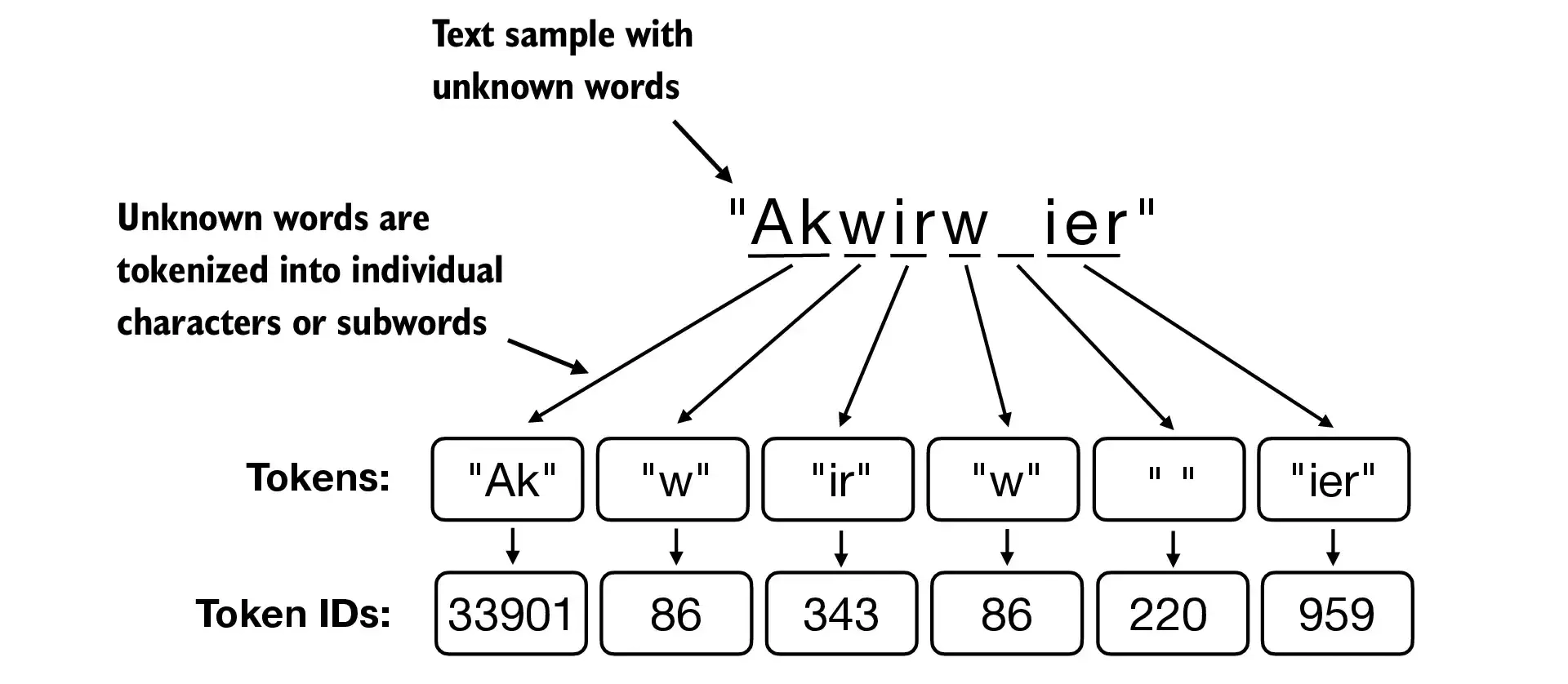
- GPT-2 used BytePair encoding (BPE) as its tokenizer
- it allows the model to break down words that aren't in its predefined vocabulary into smaller subword units or even individual characters, enabling it to handle out-of-vocabulary words
- For instance, if GPT-2's vocabulary doesn't have the word "unfamiliarword," it might tokenize it as ["unfam", "iliar", "word"] or some other subword breakdown, depending on its trained BPE merges
- The original BPE tokenizer can be found here: https://github.com/openai/gpt-2/blob/master/src/encoder.py
- We will use the BPE tokenizer from open-source tiktoken library, which implements its core algorithms in Rust to improve computational performance
- Check the notebook bytepair_encoder that compares these two implementations side-by-side (tiktoken was about 5x faster on the sample text)
import importlib
import tiktoken

print("tiktoken version:", importlib.metadata.version("tiktoken"))
tiktoken version: 0.7.0
tokenizer = tiktoken.get_encoding("gpt2")
text = (
    "Hello, have you completed <|unk|> <|unk|> <|unk|> <|endoftext|> <|unk|> <|unk|> <|unk|>?"
     "Professional Certification Course?"
)

integers = tokenizer.encode(text, allowed_special={"<|endoftext|>"})

print(integers)
[15496, 11, 423, 345, 5668, 1279, 91, 2954, 91, 29, 1279, 91, 2954, 91, 29, 1279, 91, 2954, 91, 29, 220, 50256, 1279, 91, 2954, 91, 29, 1279, 91, 2954, 91, 29, 1279, 91, 2954, 91, 29, 30, 49138, 40609, 20537, 30]
strings = tokenizer.decode(integers)

print(strings)
Hello, have you completed <|unk|> <|unk|> <|unk|> <|endoftext|> <|unk|> <|unk|> <|unk|>?Professional Certification Course?
- BPE tokenizers break down unknown words into subwords and individual characters:
1.6 Data sampling with a sliding window
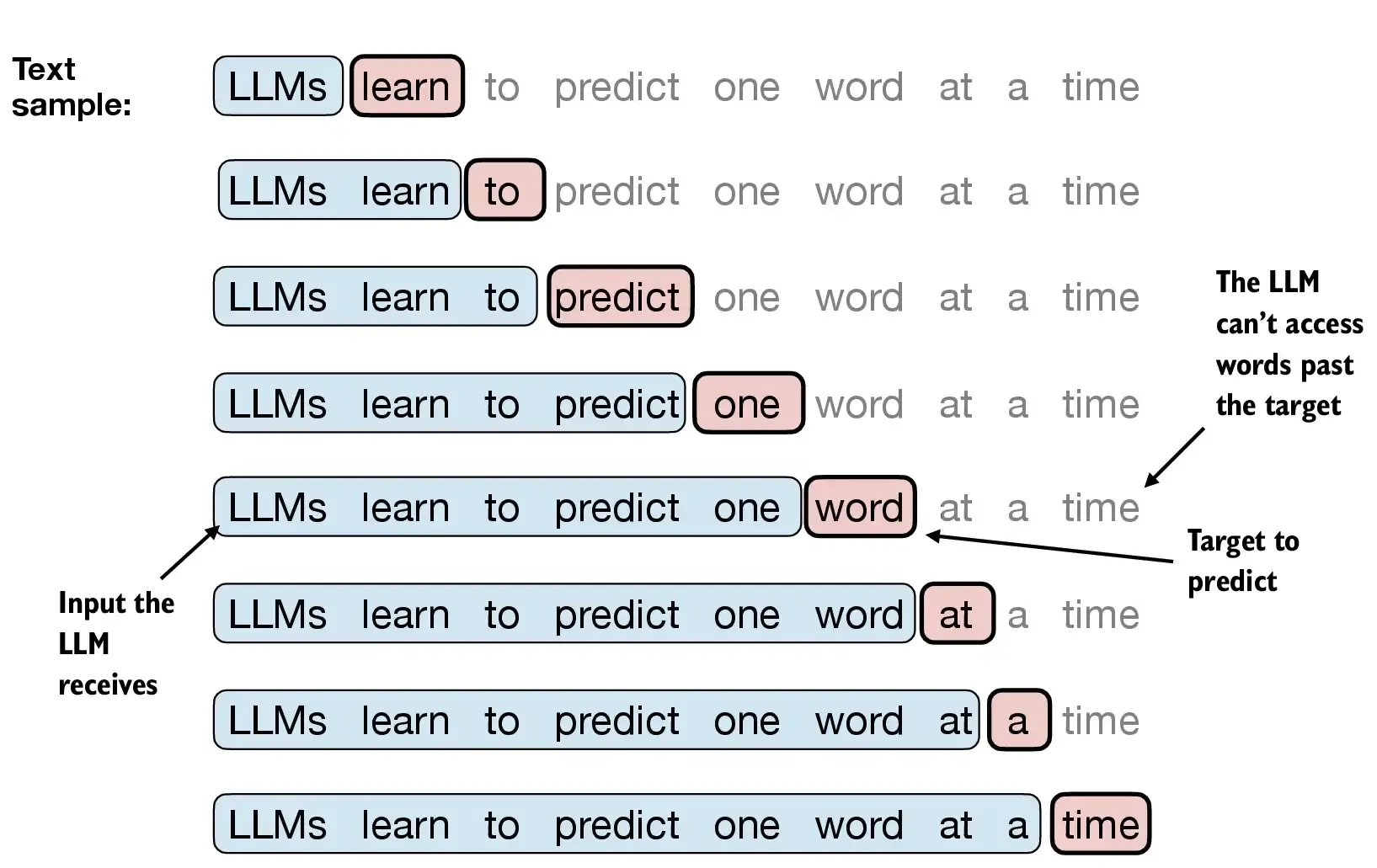
- We train LLMs to generate one word at a time, so we want to prepare the training data accordingly where the next word in a sequence represents the target to predict:
with open("wizard_of_oz.txt", "r", encoding="utf-8") as f:
    raw_text = f.read()

enc_text = tokenizer.encode(raw_text)
print(len(enc_text))
60960
- For each text chunk, we want the inputs and targets
- Since we want the model to predict the next word, the targets are the inputs shifted by one position to the right
enc_sample = enc_text[50:]
context_size = 4

x = enc_sample[:context_size]
y = enc_sample[1:context_size+1]

print(f"x: {x}")
print(f"y:      {y}")
x: [440, 57, 11, 412]
y:      [57, 11, 412, 4825]
- One by one, the prediction would look like as follows:
for i in range(1, context_size+1):
    context = enc_sample[:i]
    desired = enc_sample[i]

    print(context, "---->", desired)
[440] ----> 57
[440, 57] ----> 11
[440, 57, 11] ----> 412
[440, 57, 11, 412] ----> 4825
for i in range(1, context_size+1):
    context = enc_sample[:i]
    desired = enc_sample[i]

    print(tokenizer.decode(context), "---->", tokenizer.decode([desired]))
 O ----> Z
 OZ ----> ,
 OZ, ---->  E
 OZ, E ----> TC
- We will take care of the next-word prediction in a later part after we covered the attention mechanism
- For now, we implement a simple data loader that iterates over the input dataset and returns the inputs and targets shifted by one
- Install and import PyTorch (see Appendix A for installation tips)
import torch
print("PyTorch version:", torch.__version__)
PyTorch version: 2.5.1
- We use a sliding window approach, changing the position by +1:
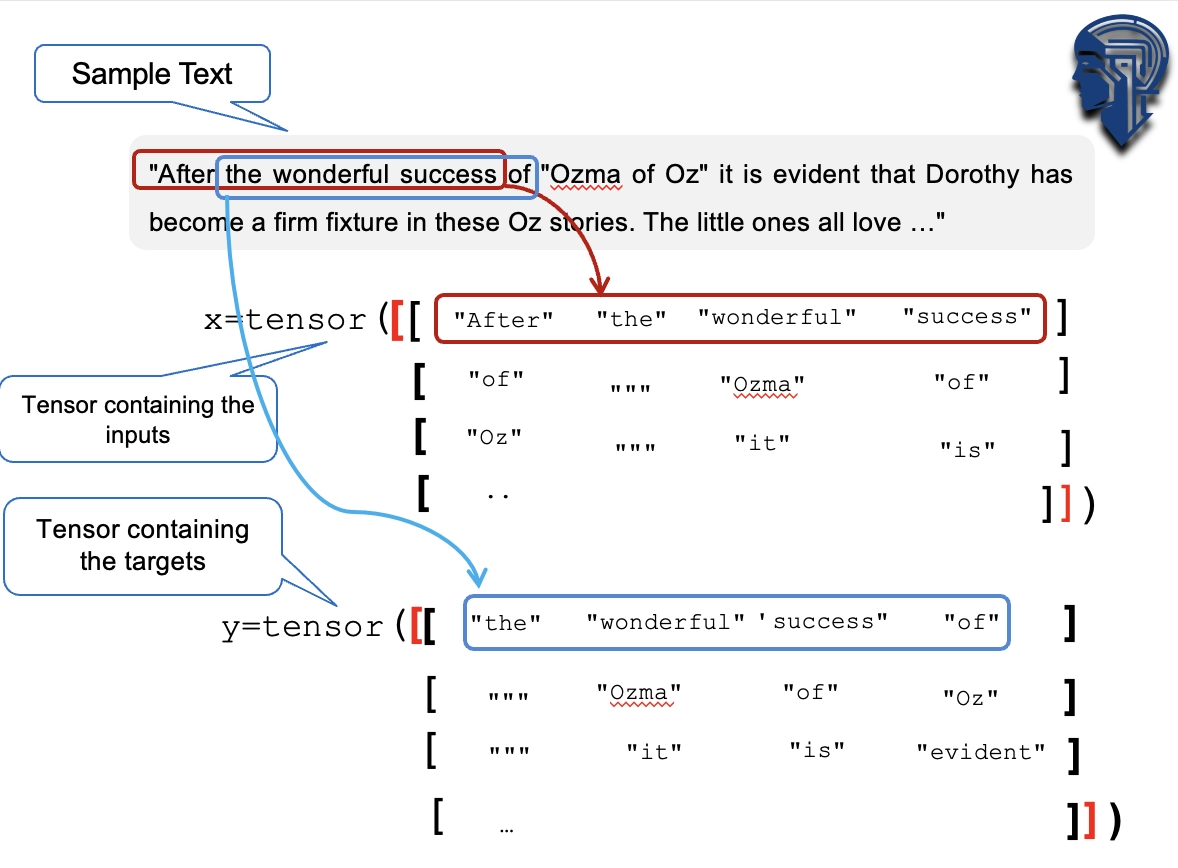
- Create dataset and dataloader that extract chunks from the input text dataset
from torch.utils.data import Dataset, DataLoader


class GPTDatasetV1(Dataset):
    def __init__(self, txt, tokenizer, max_length, stride):
        self.input_ids = []
        self.target_ids = []

        # Tokenize the entire text
        token_ids = tokenizer.encode(txt, allowed_special={"<|endoftext|>"})

        # Use a sliding window to chunk the book into overlapping sequences of max_length
        for i in range(0, len(token_ids) - max_length, stride):
            input_chunk = token_ids[i:i + max_length]
            target_chunk = token_ids[i + 1: i + max_length + 1]
            self.input_ids.append(torch.tensor(input_chunk))
            self.target_ids.append(torch.tensor(target_chunk))

    def __len__(self):
        return len(self.input_ids)

    def __getitem__(self, idx):
        return self.input_ids[idx], self.target_ids[idx]
def create_dataloader_v1(txt, batch_size=4, max_length=256,
                         stride=128, shuffle=True, drop_last=True,
                         num_workers=0):

    # Initialize the tokenizer
    tokenizer = tiktoken.get_encoding("gpt2")

    # Create dataset
    dataset = GPTDatasetV1(txt, tokenizer, max_length, stride)

    # Create dataloader
    dataloader = DataLoader(
        dataset,
        batch_size=batch_size,
        shuffle=shuffle,
        drop_last=drop_last,
        num_workers=num_workers
    )

    return dataloader
- Let's test the dataloader with a batch size of 1 for an LLM with a context size of 4:
with open("wizard_of_oz.txt", "r", encoding="utf-8") as f:
    raw_text = f.read()
dataloader = create_dataloader_v1(
    raw_text, batch_size=1, max_length=4, stride=1, shuffle=False
)

data_iter = iter(dataloader)
first_batch = next(data_iter)
print(first_batch)
[tensor([[171, 119, 123, 220]]), tensor([[119, 123, 220, 360]])]
second_batch = next(data_iter)
print(second_batch)
[tensor([[119, 123, 220, 360]]), tensor([[ 123, 220, 360, 1581]])]
- An example using stride equal to the context length (here: 4) as shown below:
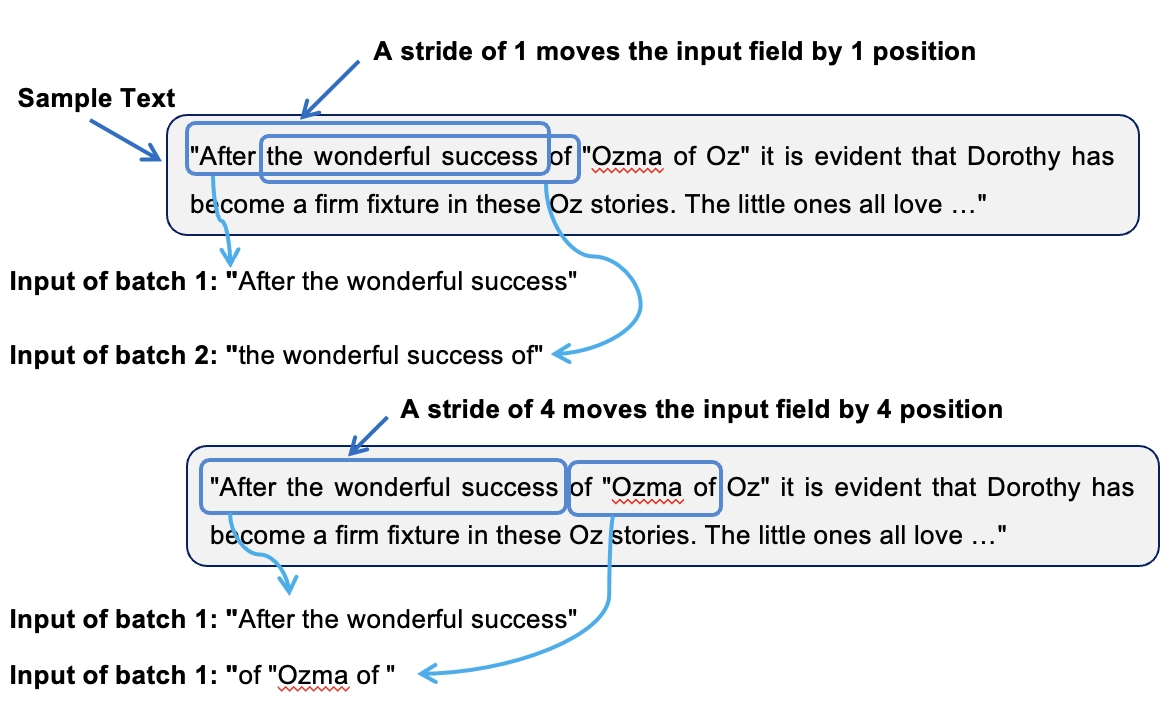
- We can also create batched outputs
- Note that we increase the stride here so that we don't have overlaps between the batches, since more overlap could lead to increased overfitting
dataloader = create_dataloader_v1(raw_text, batch_size=8, max_length=4, stride=4, shuffle=False)

data_iter = iter(dataloader)
inputs, targets = next(data_iter)
print("Inputs:\n", inputs)
print("\nTargets:\n", targets)
Inputs:
 tensor([[  171,   119,   123,   220],
        [  360,  1581, 26946,    56],
        [ 5357,  3336,   370, 14887],
        [ 9795,  3268,   440,    57],
        [  628,   220, 11050,   628],
        [  220,   406,    13,  8782],
        [15154, 23715,  5883,   628],
        [  220, 44746,  3963,  3336]])

Targets:
 tensor([[  119,   123,   220,   360],
        [ 1581, 26946,    56,  5357],
        [ 3336,   370, 14887,  9795],
        [ 3268,   440,    57,   628],
        [  220, 11050,   628,   220],
        [  406,    13,  8782, 15154],
        [23715,  5883,   628,   220],
        [44746,  3963,  3336,   370]])
1.7 Creating token embeddings
- The data is already almost ready for an LLM
- Let us embed the tokens in a continuous vector representation using an embedding layer
- Usually, these embedding layers are part of the LLM itself and are updated (trained) during model training
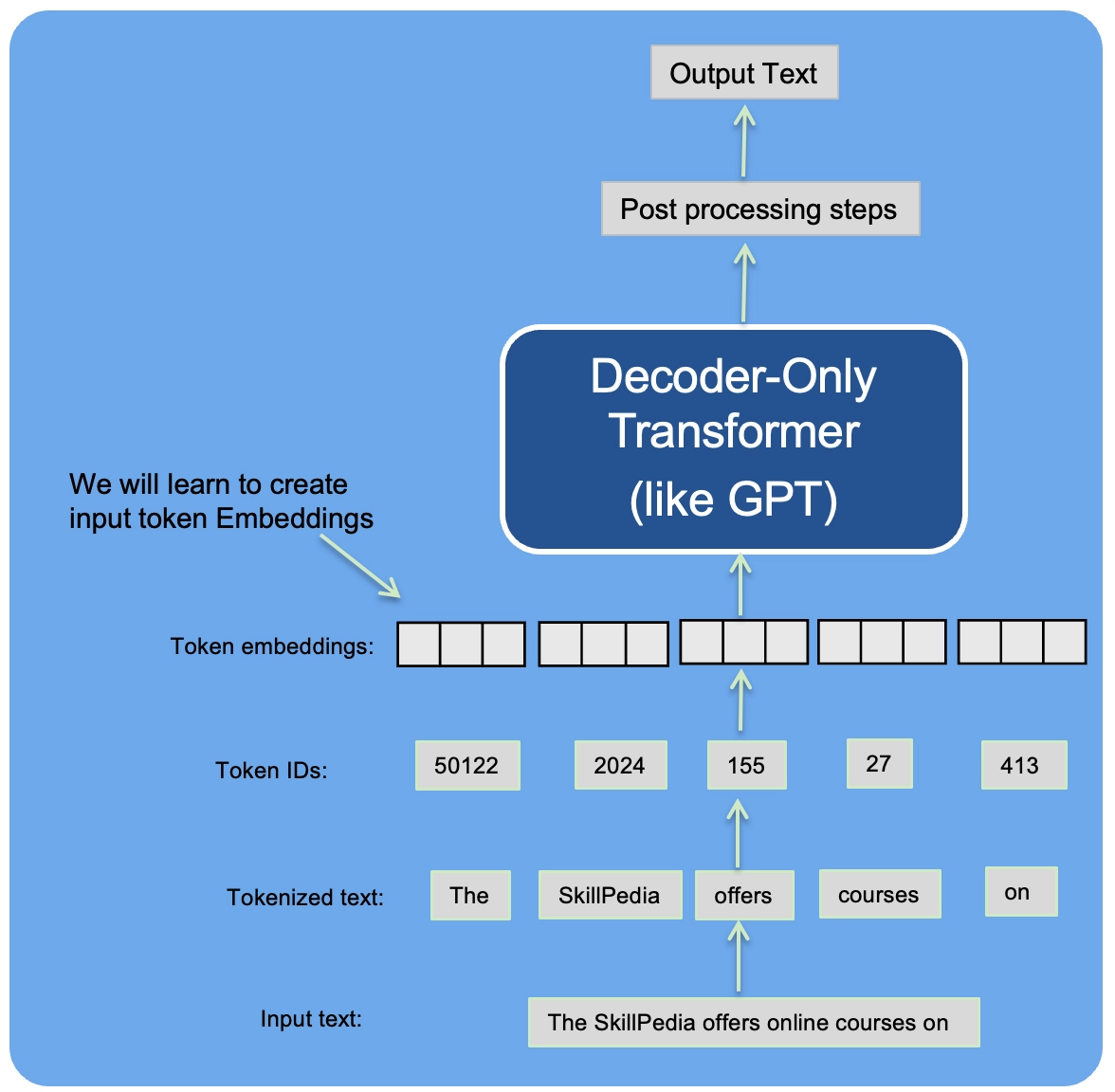
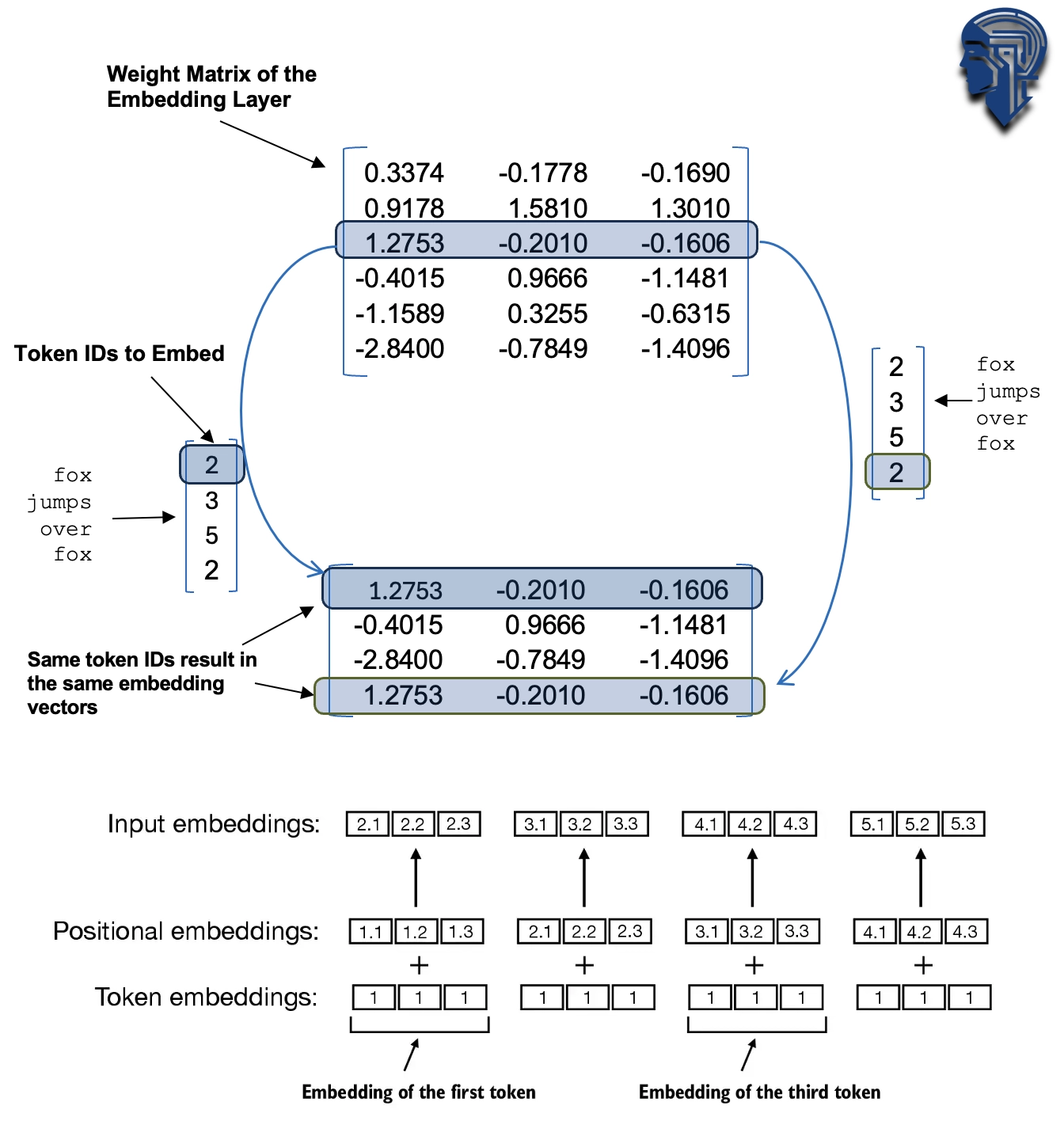
- Suppose we have the following four input examples with input ids 2, 3, 5, and 1 (after tokenization):
input_ids = torch.tensor([2, 3, 5, 1])
- For the sake of simplicity, suppose we have a small vocabulary of only 6 words and we want to create embeddings of size 3:
vocab_size = 6
output_dim = 3

torch.manual_seed(123)
embedding_layer = torch.nn.Embedding(vocab_size, output_dim)
- This would result in a 6x3 weight matrix:
print(embedding_layer.weight)
Parameter containing:
tensor([[ 0.3374, -0.1778, -0.1690],
        [ 0.9178,  1.5810,  1.3010],
        [ 1.2753, -0.2010, -0.1606],
        [-0.4015,  0.9666, -1.1481],
        [-1.1589,  0.3255, -0.6315],
        [-2.8400, -0.7849, -1.4096]], requires_grad=True)
- The embedding layer approach above is a more efficient way of implementing one-hot encoding followed by matrix multiplication in a fully-connected layer, which is described in the supplementary code in ./embedding_vs_matmul
- Because the embedding layer is just a more efficient implementation that is equivalent to the one-hot encoding and matrix-multiplication approach it can be seen as a neural network layer that can be optimized via backpropagation
- To convert a token with id 3 into a 3-dimensional vector, we do the following:
print(embedding_layer(torch.tensor([3])))
tensor([[-0.4015, 0.9666, -1.1481]], grad_fn=)
- Note that the above is the 4th row in the
embedding_layerweight matrix - To embed all four
input_idsvalues above, we do
print(embedding_layer(input_ids))
tensor([[ 1.2753, -0.2010, -0.1606],
        [-0.4015,  0.9666, -1.1481],
        [-2.8400, -0.7849, -1.4096],
        [ 0.9178,  1.5810,  1.3010]], grad_fn=)
- An embedding layer is essentially a look-up operation:
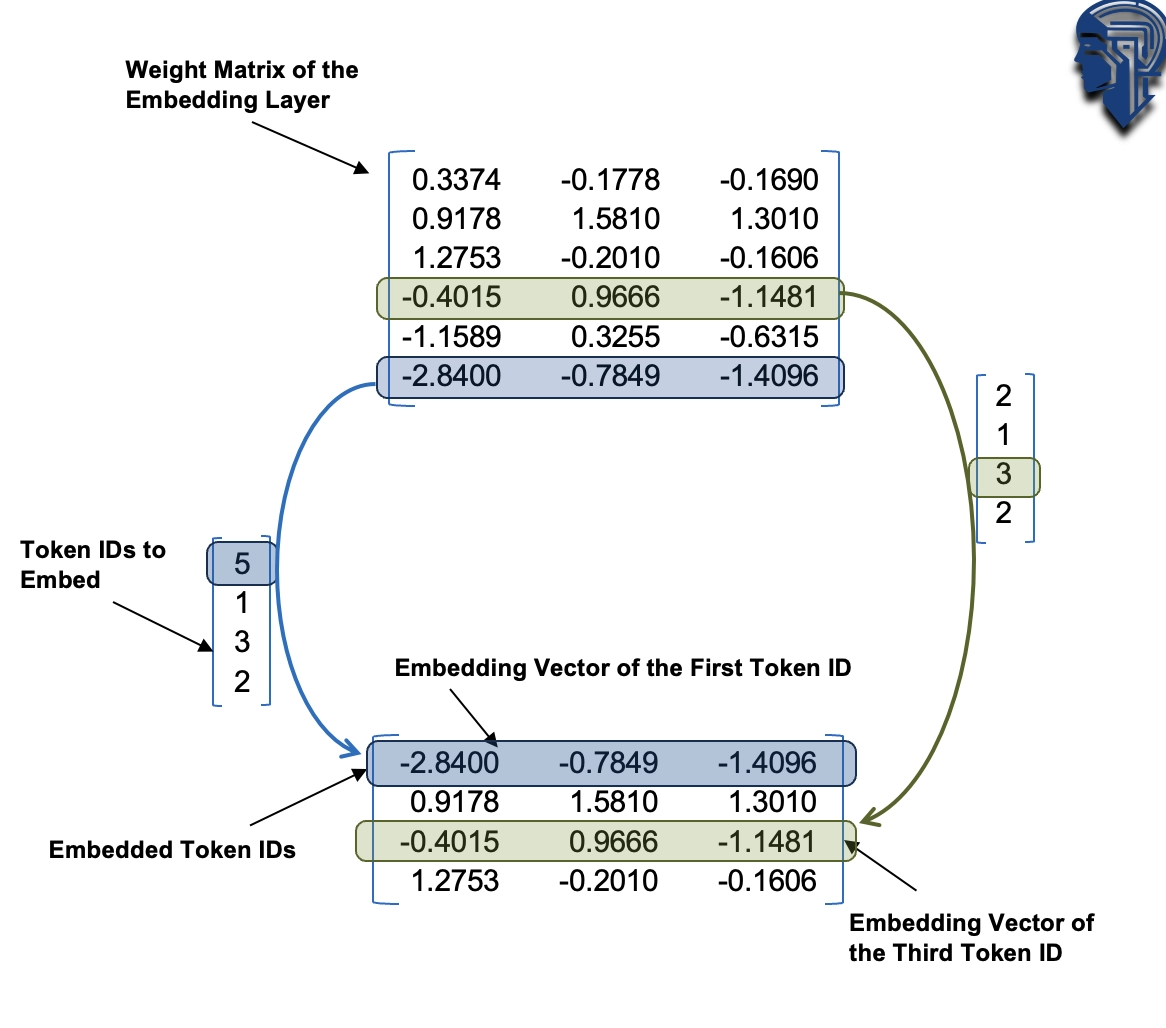
- You may be interested in the bonus content comparing embedding layers with regular linear layers: ./embedding_vs_matmul
1.8 Encoding word positions
- Embedding layer convert IDs into identical vector representations regardless of where they are located in the input sequence:
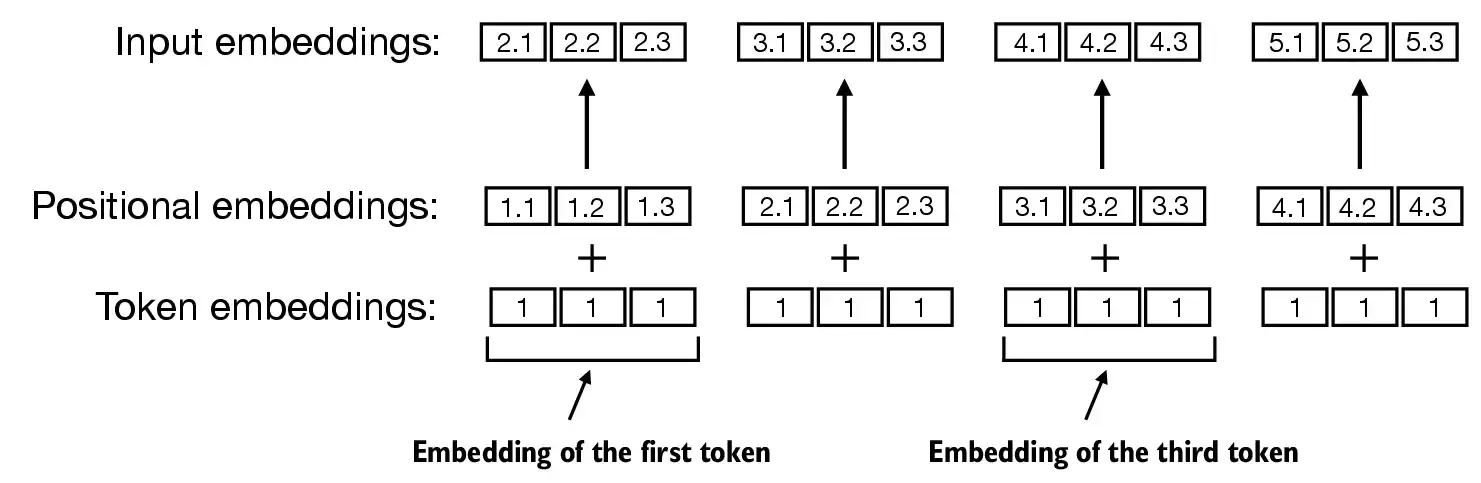
- Positional embeddings are combined with the token embedding vector to form the input embeddings for a large language model:
- The BytePair encoder has a vocabulary size of 50,257:
- Suppose we want to encode the input tokens into a 256-dimensional vector representation:
vocab_size = 50257
output_dim = 256

token_embedding_layer = torch.nn.Embedding(vocab_size, output_dim)
- If we sample data from the dataloader, we embed the tokens in each batch into a 256-dimensional vector
- If we have a batch size of 8 with 4 tokens each, this results in a 8 x 4 x 256 tensor:
max_length = 4
dataloader = create_dataloader_v1(
    raw_text, batch_size=8, max_length=max_length,
    stride=max_length, shuffle=False
)
data_iter = iter(dataloader)
inputs, targets = next(data_iter)
print("Token IDs:\n", inputs)
print("\nInputs shape:\n", inputs.shape)
Token IDs:
 tensor([[  171,   119,   123,   220],
        [  360,  1581, 26946,    56],
        [ 5357,  3336,   370, 14887],
        [ 9795,  3268,   440,    57],
        [  628,   220, 11050,   628],
        [  220,   406,    13,  8782],
        [15154, 23715,  5883,   628],
        [  220, 44746,  3963,  3336]])

Inputs shape:
 torch.Size([8, 4])
token_embeddings = token_embedding_layer(inputs)
print(token_embeddings.shape)
torch.Size([8, 4, 256])
- GPT-2 uses absolute position embeddings, so we just create another embedding layer:
context_length = max_length
pos_embedding_layer = torch.nn.Embedding(context_length, output_dim)
pos_embeddings = pos_embedding_layer(torch.arange(max_length))
print(pos_embeddings.shape)
torch.Size([4, 256])
- To create the input embeddings used in an LLM, we simply add the token and the positional embeddings:
input_embeddings = token_embeddings + pos_embeddings
print(input_embeddings.shape)
torch.Size([8, 4, 256])
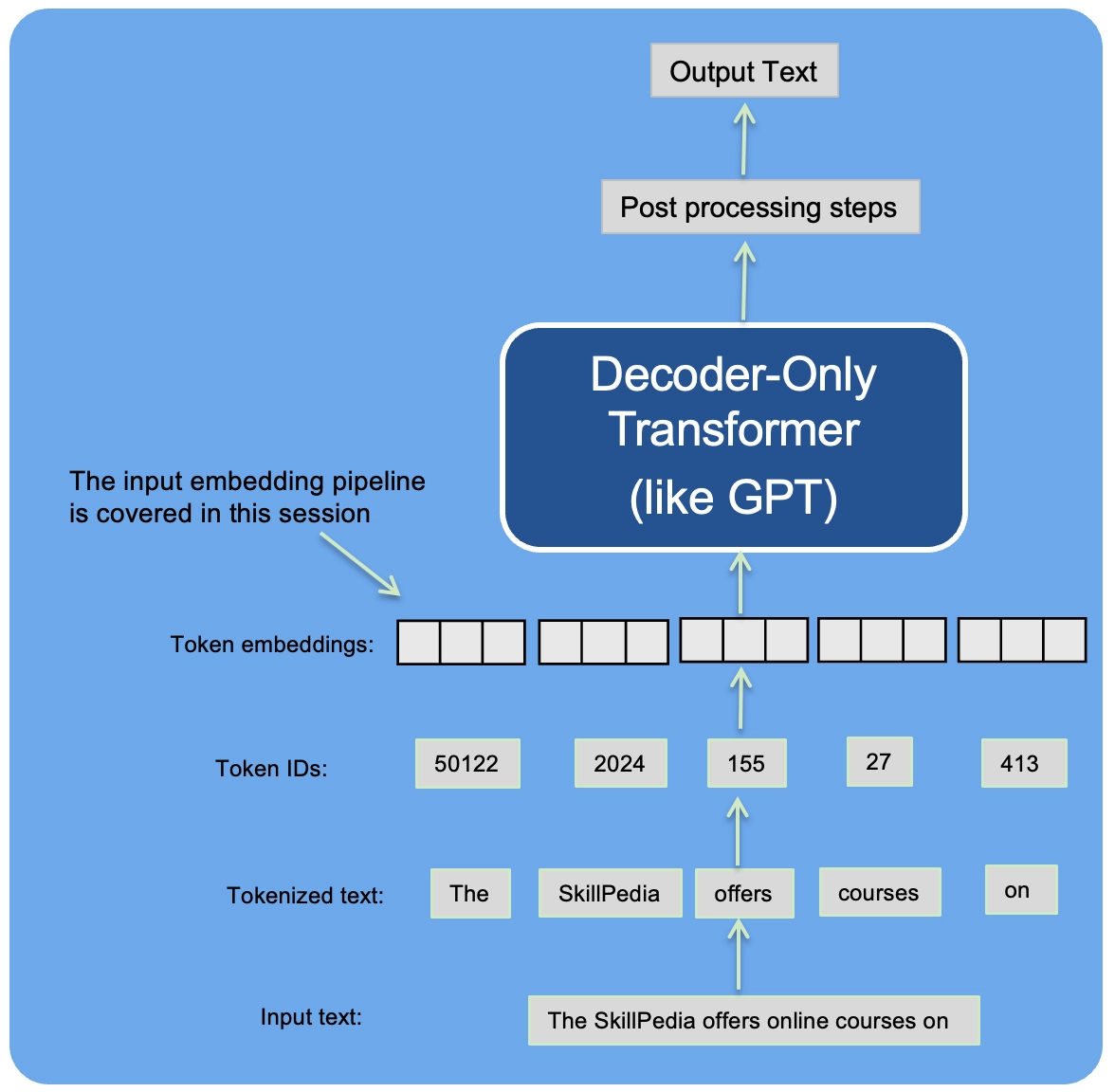
- In the initial phase of the input processing workflow, the input text is segmented into separate tokens
- Following this segmentation, these tokens are transformed into token IDs based on a predefined vocabulary:
Summary and takeaways
See the ./dataloader.ipynb code notebook, which is a concise version of the data loader that we implemented in this part and will need for training the GPT model in upcoming parts.